

WhatsApp username reservation is now open, allowing users to secure their desired handles before the feature rolls out globally. This Monday, Meta's WhatsApp began letting users reserve identifiers ahead of general availability, and many, including this writer, rushed to claim theirs. The process wasn't without obstacles, but with a few tips, you can navigate it smoothly.
What Is WhatsApp Username Reservation?
WhatsApp usernames are not meant to replace phone numbers for account creation, but they add a more private way to initiate certain contacts. Reserving your username early ensures you get a handle that reflects your identity before it's taken. The feature is part of WhatsApp's broader push to enhance user privacy and control.
Find Original Home Decor sparking conversation at Grand Goldman Shop.

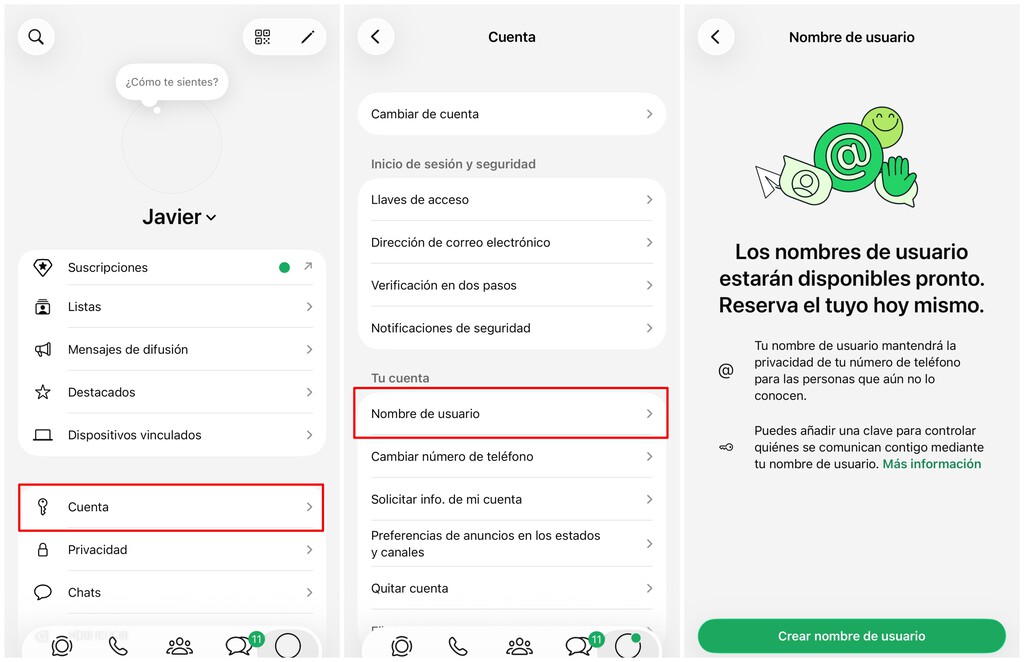
According to early users, the reservation option appeared in the app's settings under Account. However, availability may vary by region and device, so if you don't see it yet, keep checking.
How to Reserve Your WhatsApp Username: Step by Step
Based on firsthand experience, here's the process to reserve your username. Note that the exact steps may vary slightly depending on your app version.
- Open WhatsApp and tap the You tab in the bottom bar (next to Chats).
- Go to Account and then Username.
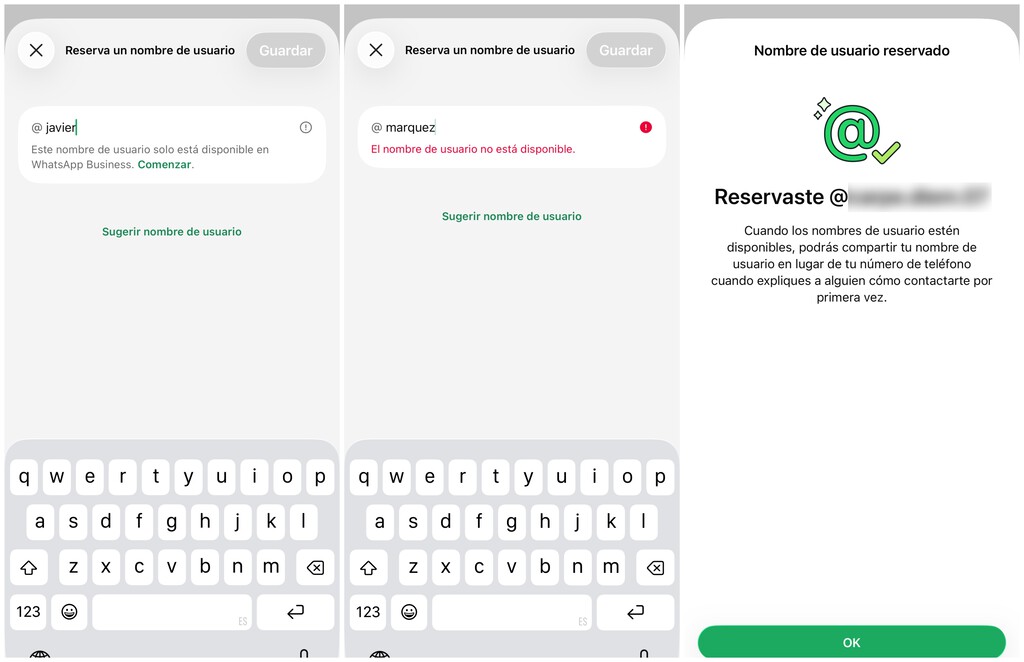
- If the option is available, you'll be prompted to choose a username. Enter your desired handle.
- Follow the prompts to confirm reservation. You may need to verify your identity or set up a privacy key.
In our test, the option wasn't immediately available but appeared a few hours later. So if you don't see it, try again later.
Activating Your Privacy Key
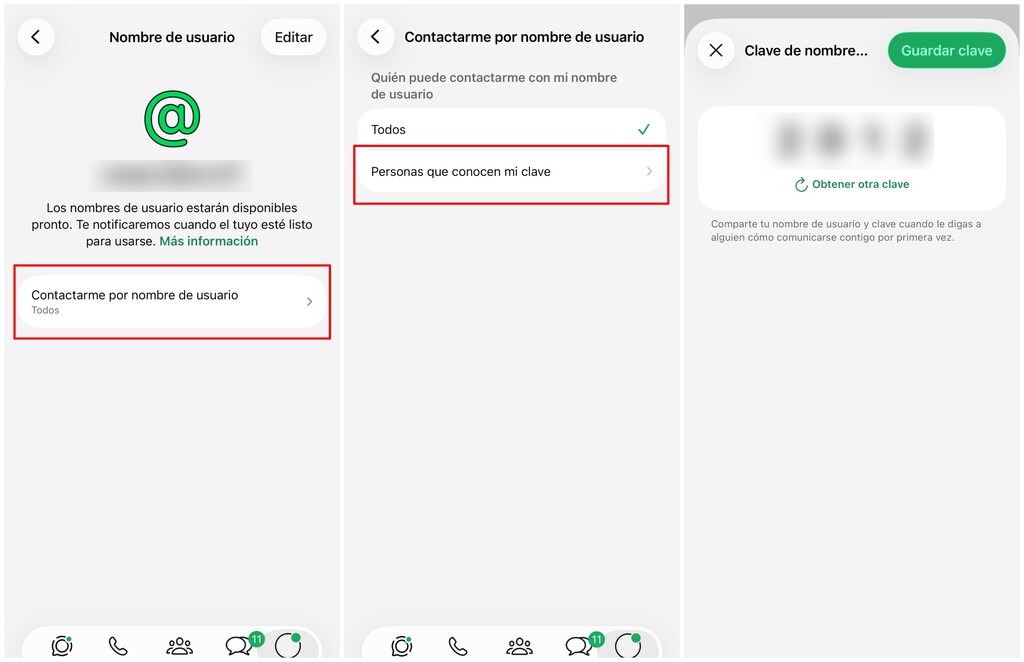
During reservation, WhatsApp may ask you to activate a privacy key. This key adds an extra layer of security, ensuring only approved contacts can find you via your username. The key is likely a PIN or a cryptographic token that you'll need to share selectively.
To activate it, follow the on-screen instructions after selecting your username. You'll be guided to set up the key, which you can then manage in the privacy settings. This step is crucial for maintaining control over who can contact you.
Common Obstacles and How to Overcome Them
The most common hurdle is the unavailability of the username option. This could be due to a staged rollout or regional restrictions. If you encounter this, ensure your app is updated to the latest version and check back periodically.
Another issue is username availability. Popular handles may already be taken, so be prepared with alternatives. WhatsApp might also impose naming rules, such as minimum length or character restrictions, so familiarize yourself with those guidelines. The background to this story is set out in WhatsApp Usernames: The Real Reason Behind the Feature. A related thread runs through WhatsApp Usernames: What They Are and How to Reserve Yours. Earlier coverage in WhatsApp Usernames Raise New Identity Theft Concerns shows how the argument developed.
Key Takeaways for Early Adopters
- Reserve early: Usernames are first-come, first-served, so act quickly once the option appears.
- Privacy key is essential: Activate it to control who can find you via username.
- Check for updates: Ensure your app is current and monitor for the feature's availability.
- Have backups: Prepare alternative usernames in case your first choice is taken.
- Understand the scope: Usernames complement, not replace, phone numbers for account creation.
WhatsApp Username vs. Phone Number: What Changes?
While phone numbers remain primary identifiers, usernames offer a secondary, more private contact method. This table summarizes the differences. A closer look at the same subject appears in How to PIN Protect Your WhatsApp Username for Secure Messaging. Anyone following the wider picture can start with Short-Form Video Editing Trend: No Breaths Allowed. The same theme surfaces in WhatsApp Blue Ticks: Reclaim Your Peace and Privacy Now, which takes a different angle.
| Aspect | Phone Number | Username |
|---|---|---|
| Primary use | Account creation and login | Optional contact method |
| Privacy | Shared with contacts | Shared only with approved contacts via privacy key |
| Uniqueness | Unique per account | Unique handle, first-come first-served |
| Reservation | Not applicable | Available now for early reservation |
What to Watch Next
As WhatsApp rolls out usernames more broadly, expect refinements to the reservation process and privacy controls. Keep an eye on official announcements for updates on availability and features. In the meantime, securing your username now could save you hassle later. Context on how this played out before sits in Technology: latest articles. A companion piece, WhatsApp Account Hijacking: Meta's New Alerts Protect You, approaches the same subject from another angle.
FAQ
Can I reserve a WhatsApp username without a phone number?
No, a phone number is still required to create and maintain a WhatsApp account. Usernames are an additional layer for privacy and contact, not a replacement for phone verification.
What is a privacy key in WhatsApp usernames?
The privacy key is a security feature that lets you control who can find you via your username. It likely involves a PIN or token that you share with trusted contacts, ensuring only they can initiate contact using your handle.
Why can't I see the username option in my WhatsApp?
The feature is rolling out gradually, so it may not be available to all users yet. Ensure your app is updated and check back periodically. Availability may also depend on your region and device.
Are WhatsApp usernames permanent once reserved?
WhatsApp hasn't specified permanence, but reserving early likely secures your handle for future use. However, policies may evolve, so stay informed through official channels.







