

If you work from home and spend long hours at your computer, a vertical mouse might be the best purchase you make for your setup. After years of remote work, I finally switched to an ergonomic vertical mouse, and it transformed my daily comfort.
Like many remote workers, I ignored the early warning signs: tingling hands, a sore wrist, and occasional elbow pain. It wasn't until the discomfort became constant that I decided to try a vertical mouse. The difference was remarkable.
Find Original Home Decor sparking conversation at Grand Goldman Shop.

Why I Switched to a Vertical Mouse
My job requires me to be at the computer for eight or more hours a day. Over time, I noticed my hands and wrists aching after just a few hours of work. The pain sometimes radiated to my elbow. I knew I had to make a change.
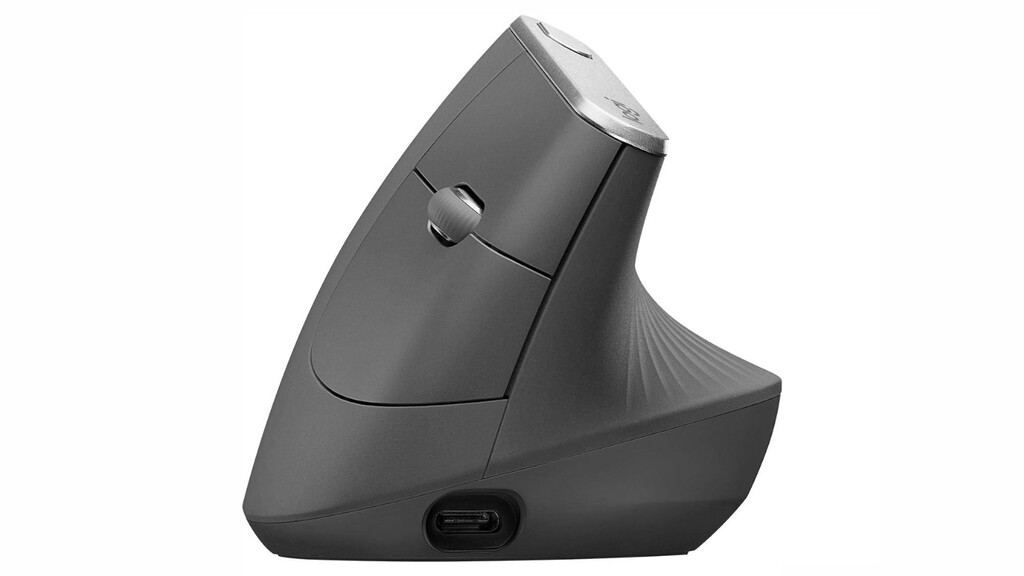
After some research, I chose the Logitech MX Vertical, a popular ergonomic mouse that promises a more natural hand position. The goal of vertical mice is to reduce muscle strain by keeping your hand in a handshake-like posture, rather than flat and twisted.
The Adjustment Period
Switching from a traditional mouse to a vertical one isn't instantaneous. It took me a few days to get used to the new grip and movement. But within a week, the benefits became clear: less tension in my hand and forearm, and no more nagging pain at the end of the day.
If you're considering the switch, be prepared for a short learning curve. The payoff is worth it.
Key Benefits of a Vertical Mouse for Remote Work
Vertical mice are designed to promote a more natural wrist and hand position, which can help prevent repetitive strain injuries. Here are the main advantages I experienced:
- Reduced hand and wrist pain: The vertical design keeps your hand in a neutral position, decreasing pressure on the median nerve.
- Less forearm tension: By engaging larger arm muscles, you avoid overworking small wrist muscles.
- Improved comfort during long sessions: I can now work through the day without constantly shaking out my hands.
- Better posture: Your arm rests in a more relaxed, handshake-like orientation.
- Easy to adapt: Most users adjust within a week or two.
Logitech MX Vertical: Features and Performance
The Logitech MX Vertical is a well-regarded option in the ergonomic mouse market. It offers a 57-degree vertical angle, which is designed to reduce wrist pressure by up to 10% compared to a traditional mouse. It also features a comfortable thumb rest and customizable buttons.
In my experience, the build quality is excellent, and the mouse tracks smoothly on various surfaces. The battery life is impressive, lasting weeks on a single charge.
Comparison with Traditional Mice
| Feature | Vertical Mouse (Logitech MX Vertical) | Traditional Mouse |
|---|---|---|
| Hand Position | Handshake-like (neutral) | Flat, palm-down (twisted) |
| Wrist Strain | Reduced | Higher |
| Learning Curve | Short adjustment period | None |
| Best For | Long hours, ergonomic needs | General use, gaming |
Who Should Consider a Vertical Mouse?
If you experience any discomfort in your hands, wrists, or forearms during computer work, a vertical mouse is worth trying. It's especially beneficial for remote workers, programmers, writers, and anyone who spends extended periods using a mouse.
However, if you're a gamer who requires quick, precise movements, a traditional mouse might still be preferable. But for productivity and comfort, vertical mice are a game-changer. The background to this story is set out in Logitech MX Vertical Mouse 50% Off: Ergonomic Comfort Deal. A related thread runs through Remote Work Comfort: Essential Accessories to Upgrade Your Setup. Earlier coverage in FBI Cracks Down on North Korean Remote Work Scams shows how the argument developed.
Tips for Transitioning to a Vertical Mouse
To make the switch smoother, give yourself time to adjust. Start by using the vertical mouse for short periods and gradually increase usage. Ensure your desk and chair are at the right height to support good posture. And don't ignore pain—listen to your body and take breaks. A closer look at the same subject appears in Lidl Mini Air Cooler for Remote Work Hits Stores July 10. Anyone following the wider picture can start with Standing Desk vs Traditional Desk: Which Is Best for Remote Work. The same theme surfaces in Remote Work and Environment: Australia's Green Advantage, which takes a different angle.
After a few weeks, you'll likely wonder how you ever managed without it. Context on how this played out before sits in Portable Monitors for Remote Work: Top Picks for Travel. A companion piece, Top Remote Work Security Tools for Laptop and Mobile, approaches the same subject from another angle.
FAQ
Is a vertical mouse good for remote work?
Yes, a vertical mouse can be excellent for remote work. It promotes a more natural hand position, reducing strain during long hours at the computer. Many users report decreased pain and improved comfort.
How long does it take to get used to a vertical mouse?
Most people adapt within a few days to a couple of weeks. It's a good idea to ease into it by using the mouse for shorter periods initially.
Can a vertical mouse help with carpal tunnel syndrome?
While not a cure, a vertical mouse can alleviate symptoms by reducing pressure on the wrist. Consult a doctor for proper diagnosis and treatment.
Is the Logitech MX Vertical worth the price?
For those experiencing discomfort, the Logitech MX Vertical is a worthwhile investment. Its ergonomic design and build quality justify the cost for many remote workers.
Browse the Shop
 Acacia frida deluxe solid wood bed frame |
Bedroom bench |
Bed chest drawers |
Lingerie dresser |
Frame base |
Mirror with jewelry storage |
30 Bathroom Vanity |
Memory foam queen mattress |
Mattresses for back pain |
Nightstand set of 2 |
Grand Goldman Shop |
Civil Lawyer
Deutschland Trikot WM 2026







