

The Logitech Pebble 2 combo is now available at its lowest price ever: just $34.90. This wireless keyboard and mouse set is perfect for students who need a lightweight, quiet, and affordable solution for classes and library sessions.
Originally priced at $53.99, this deal saves you nearly $20 on a combo that typically receives strong reviews for its portability and silent operation. If you're looking to shed weight from your backpack without sacrificing functionality, this is a compelling offer.
Find Original Home Decor sparking conversation at Grand Goldman Shop.

What's Included in the Logitech Pebble 2 Combo?
The combo pairs the Logitech K380s keyboard with the Pebble 2 mouse. Both are designed with portability in mind, featuring compact dimensions and wireless connectivity via Bluetooth.
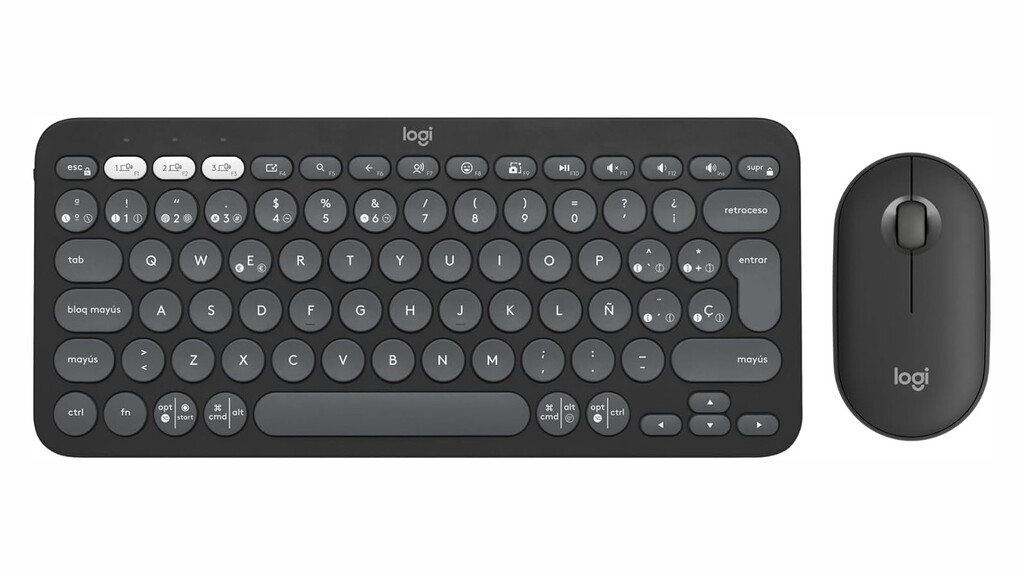
The keyboard allows you to switch between three devices seamlessly, making it easy to jump from your tablet to your phone or laptop. It also includes 10 customizable Fn keys through Logi Options+ software, and the concave rounded keys provide a comfortable typing experience.
The mouse, on the other hand, is nearly silent, thanks to Logitech's SilentTouch technology. That means you can click away in a quiet library or classroom without disturbing those around you.
Why This Deal Matters for Students
Students often carry heavy backpacks filled with books and gadgets. Every ounce counts, and this combo is exceptionally light. The keyboard weighs just over 14 ounces (400 grams), while the mouse is a mere 3.5 ounces (100 grams). Together, they add minimal bulk to your bag.
Moreover, the wireless design means no tangled cords or need for extra USB ports. Both devices connect via Bluetooth, so they work with a wide range of devices, including tablets, laptops, and even smartphones.
Battery life is another strong point: Logitech claims up to three years of usage on a single set of batteries (two AAA for the keyboard, one AA for the mouse). That means you won't have to worry about recharging frequently.
Key Features at a Glance
- Silent operation: The Pebble 2 mouse and K380s keyboard are designed to be quiet, ideal for shared spaces.
- Multi-device support: Keyboard can pair with up to three devices and switch with a tap.
- Long battery life: Up to 3 years of battery life for both peripherals.
- Compact and lightweight: Easy to slip into a backpack or carry by hand.
- Customizable keys: 10 Fn keys can be personalized via Logi Options+.
How It Compares to Other Budget Combos
To give you a better sense of the value, here's how the Logitech Pebble 2 combo stacks up against similar offerings:
| Feature | Logitech Pebble 2 Combo | Typical Budget Combo |
|---|---|---|
| Price | $34.90 (deal) | $25–$40 |
| Silent Clicks | Yes | Often no |
| Multi-device pairing | Yes (3 devices) | Usually 1 device |
| Battery Life | Up to 3 years | 6–12 months |
| Weight | ~17.5 oz total | ~20–24 oz |
As you can see, the Pebble 2 combo offers premium features like silent operation and multi-device support at a price that's competitive with basic alternatives. The three-year battery life is particularly impressive and reduces the hassle of frequent battery changes.
Who Should Buy This Combo?
This deal is ideal for students who use a tablet or laptop for note-taking and need a reliable keyboard and mouse. The silent mouse is a blessing in quiet environments, and the compact keyboard doesn't sacrifice typing comfort.
It's also a good choice for professionals who travel frequently and want a lightweight backup set. The ability to switch between devices quickly makes it handy for those who juggle multiple gadgets.
However, if you're a heavy gamer or need advanced features like backlighting or programmable macro keys, this combo might not be for you. It's designed for everyday productivity, not gaming. The background to this story is set out in Logitech Pebble Keys 2 K380s: The Pastel Keyboard Your Setup Needs. A related thread runs through Corsair Skiff 100 Budget Gaming Keyboards and Mouse. Earlier coverage in Logitech Pebble Keys 2 Review: Compact Multi-Device Keyboard shows how the argument developed.
Where to Get the Deal
This offer is available on Amazon, where the price has dropped to $34.90. Given that this is the lowest price we've seen, it's likely to sell out quickly. If you're interested, don't wait too long. A closer look at the same subject appears in HP OmniStudio All-in-One PC: Monitor, Keyboard, Mouse and Windows 11. Anyone following the wider picture can start with 15 Best Early Back-to-School Deals for Students and Parents. The same theme surfaces in Early Back-to-School Sales 2025: 15 Best Deals for Students, which takes a different angle.
Remember, deals like this come and go, so it's worth checking the current price before making a purchase. Also, consider whether you need a warranty or extra support; Logitech typically offers a one-year limited warranty on its peripherals. Context on how this played out before sits in Best Back-to-School Deals 2025: 15 Top Sales for Students. A companion piece, Compatible with Win., Mac and Linux... Connection with 3 devices and more at €45 From Greece is the most honest Combo Keyboard, mouse... (Video & Giveaway), approaches the same subject from another angle.
FAQ
Is the Logitech Pebble 2 combo compatible with Mac and Windows?
Yes, both the keyboard and mouse are compatible with multiple operating systems, including Windows, macOS, iPadOS, and Android. They connect via Bluetooth, so no additional dongle is required.
How long does the battery last in the Pebble 2 combo?
Logitech claims up to three years of battery life for both the keyboard and mouse, assuming typical usage. The keyboard uses two AAA batteries, while the mouse uses one AA battery.
Can I customize the keyboard shortcuts?
Yes, the 10 Fn keys can be personalized using Logi Options+ software, allowing you to assign shortcuts for apps, media control, and more.
Is the mouse truly silent?
The Pebble 2 mouse features SilentTouch technology, which reduces clicking noise by over 90% compared to standard mice. It's ideal for quiet environments like libraries and classrooms.
Browse the Shop
 Acacia frida deluxe solid wood bed frame |
Bedroom bench |
Bed chest drawers |
Lingerie dresser |
Frame base |
Mirror with jewelry storage |
30 Bathroom Vanity |
Memory foam queen mattress |
Mattresses for back pain |
Nightstand set of 2 |
Grand Goldman Shop |
Civil Lawyer
Deutschland Trikot WM 2026







