

For many seniors, the Fire TV Stick has become a simple way to access streaming content and enjoy television on their own terms. In my family, we've bought three Fire TV Sticks with one goal: to help my parents watch more than just conventional TV. They can now discover movies, series, and documentaries without being tied to a broadcast schedule.
It's a common challenge: sometimes the TV is just background noise while they use the computer or do other things. But with a Fire TV Stick, they're actively engaged in content they love. Here's what we've learned about making streaming accessible for older adults.
Find Original Home Decor sparking conversation at Grand Goldman Shop.

Why a Fire TV Stick Is Ideal for Seniors
The Fire TV Stick is compact, affordable, and easy to use. For seniors who are new to streaming, it's a gentle introduction. The remote is simple, and the interface can be navigated with minimal tech skills. Plus, it's portable—you can move it from one TV to another.
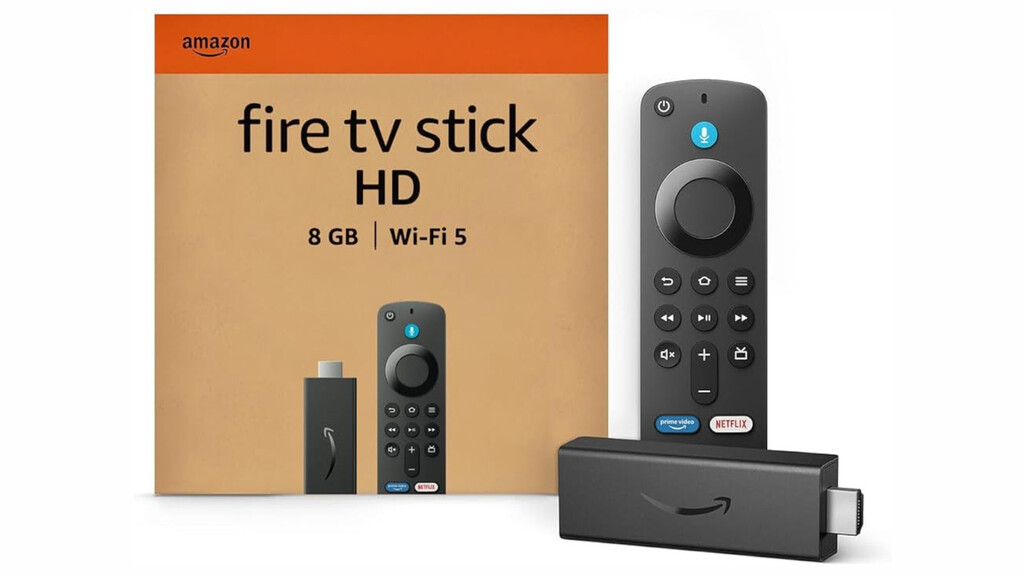
My parents started with the HD model because their TVs are Full HD. They loved it immediately. At first, they used it mainly in the kitchen TV, watching movies while eating. Over time, they got comfortable unplugging it and moving it to the living room TV. That's the beauty of the dongle design—it's small and travel-friendly.
Key Benefits for Older Adults
- Affordable: Often on sale, the HD model is budget-friendly.
- Portable: Move it between TVs easily.
- Simple interface: Easy to navigate with a basic remote.
- Access to streaming: Netflix, Prime Video, and more.
- Voice control: Some models support Alexa for hands-free search.
Setting Up a Fire TV Stick for Elderly Users
Setup is straightforward: plug the stick into an HDMI port, connect to Wi-Fi, and sign in to streaming accounts. But for seniors, a few tweaks can make a big difference. For example, you can customize the home screen to show only the apps they use most.
You can also enable Alexa voice remote if available, so they can say "Find comedies" instead of typing. And consider setting up a kids profile (yes, really) to limit content to safe, familiar genres. It's a trick to keep the interface uncluttered.
Common Challenges and Solutions
One issue: the remote can be small and slippery. A silicone cover helps. Another: they might forget how to switch inputs. Label the HDMI port or use a universal remote. Also, ensure the Wi-Fi signal is strong; a weak connection causes buffering, which frustrates users.
My parents now have two Fire TV Sticks—one for the kitchen and one for the living room. They no longer unplug and replug. It's a small investment that brings them a lot of joy.
Comparing Fire TV Stick Models for Seniors
Amazon offers several models. The HD version is the most basic and affordable, perfect for 1080p TVs. The 4K models are overkill unless you have a 4K TV and want future-proofing. The Lite model is even cheaper but lacks volume control on the remote.
| Model | Resolution | Remote | Best For | Price (approx) |
|---|---|---|---|---|
| Fire TV Stick Lite | 1080p | Basic, no TV controls | Budget users | $29.99 |
| Fire TV Stick HD | 1080p | With TV controls | Most seniors | $39.99 |
| Fire TV Stick 4K | 4K | With TV controls | 4K TV owners | $49.99 |
For most seniors with older TVs, the HD model strikes the best balance. It's often discounted, so watch for sales.
How to Make Streaming Accessible for Elderly Parents
Beyond the device, consider the accounts. If you share your Netflix or Prime account, they can access a wide library. But make sure they know how to navigate. Sit with them a few times and show them how to search and play. The background to this story is set out in Amazon's New Fire TV Stick HD Is Here and Discounted. A related thread runs through Amazon Fire TV Stick HD Deal at MediaMarkt: Limited-Time Offer. Earlier coverage in Amazon Fire TV Stick 4K: New Remote, OS, and USB Power shows how the argument developed.
Also, consider a universal remote that combines TV and Fire TV controls. This reduces confusion. And if they have a smart speaker, link it to the Fire TV for voice control. A closer look at the same subject appears in Fire TV Stick HD Drops to Just 20 Euros for Prime Day. Anyone following the wider picture can start with Xiaomi TV Box S 3rd Gen: The Best Fire TV Stick Alternative. The same theme surfaces in Xiaomi TV Stick HD vs Fire TV Stick HD: Best Cheap Streaming Dongle for 2026, which takes a different angle.
My parents now enjoy watching documentaries and classic movies. They feel more independent and engaged. It's a small tech upgrade that enhances their daily life. Context on how this played out before sits in Xiaomi TV Stick Outlet Deal at Carrefour: Cheap Fire TV Alternative. A companion piece, MediaMarkt's Best Deals on Kindle, Fire TV Stick, and Echo, approaches the same subject from another angle.
FAQ
Is the Fire TV Stick easy for seniors to use?
Yes, the interface is simple, and the remote is straightforward. With a little guidance, most seniors can navigate it easily.
Can I move the Fire TV Stick between TVs?
Absolutely. It's portable—just unplug from one HDMI port and plug into another. You'll need to reconnect to Wi-Fi if the network differs.
What's the best Fire TV Stick model for elderly users?
The HD model is usually sufficient. It's affordable and works with most TVs. If they have a 4K TV, consider the 4K model for better quality.
How can I help my parents set up streaming accounts?
Sign in for them and show them how to access apps. Create a simple guide or label the remote buttons.







